
Key takeaways
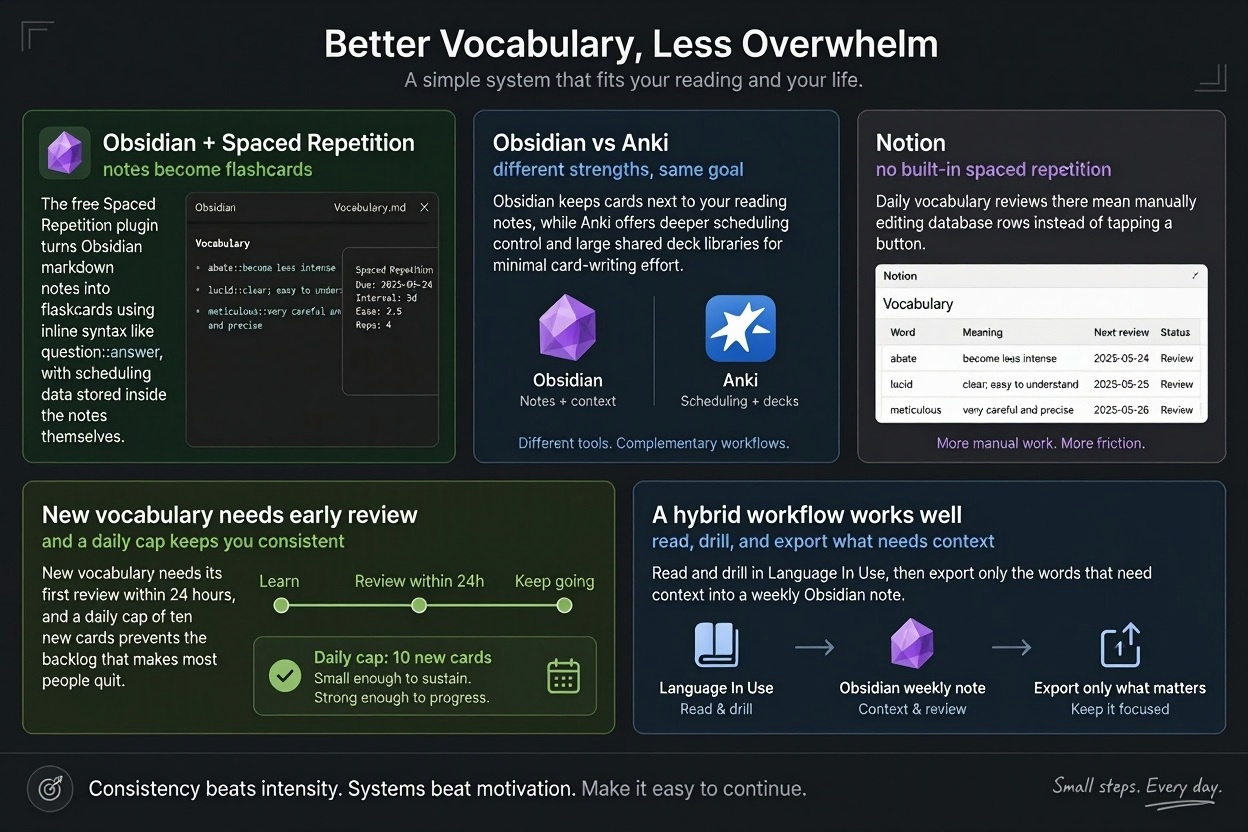
- The free Spaced Repetition plugin turns Obsidian markdown notes into flashcards using inline syntax like question::answer, with scheduling data stored inside the notes themselves.
- Obsidian keeps cards next to your reading notes, while Anki offers deeper scheduling control and large shared deck libraries for minimal card-writing effort.
- Notion has no built-in spaced repetition, so daily vocabulary reviews there mean manually editing database rows instead of tapping a button.
- New vocabulary needs its first review within 24 hours, and a daily cap of ten new cards prevents the backlog that makes most people quit.
- A hybrid workflow works well: read and drill in Language In Use, then export only the words that need context into a weekly Obsidian note.
Yes, you can run spaced repetition in Obsidian for free, on Mac, iPhone, iPad and Windows, using the Spaced Repetition plugin to turn notes from your graded reading into a review queue. This guide walks through the full setup, compares it side-by-side with Anki and Notion, and covers when a dedicated reading-based tool fits better.
Does spaced repetition work, and what does the evidence say?
Yes. Spacing reviews over days and weeks is one of the most consistently supported findings in learning research. A peer-reviewed meta-analysis of 254 studies found that spaced practice produced stronger recall than massed practice across a wide range of materials and retention intervals (Cepeda et al., 2006, Psychological Bulletin).
What spacing actually changes in memory
Each time you retrieve a word just as it starts to fade, retrieval takes effort, and that effort strengthens the memory trace. Cramming feels productive because recall is easy in the moment, but the trace decays quickly.
Where the evidence is weaker (vocabulary in isolation vs in context)
Most studies test isolated flashcards, not words met inside graded reading. Words learned in context, like the conjugations you can browse on Language In Use, tend to stick better because context gives the memory something to attach to. Treat SRS as the review layer, not the whole method.
How do you set up spaced repetition in Obsidian?
Installing and enabling the Spaced Repetition plugin
Open Obsidian, go to Settings → Community plugins, turn off Restricted mode, and browse for "Spaced Repetition" by Stephen Mwangi. Install it, enable it, then open its settings and set the deck default to your preferences: flashcard tags like #flashcards, and whether cards are scheduled per note or per vault. No account is needed; the plugin stores scheduling data inside your notes as comments, which is why the whole thing stays portable.
Flashcard syntax: inline cards vs multi-line cards
Inline cards sit on one line, separated by ::: retirar :: to withdraw, to take out. Multi-line cards use a blank line with ? on the separator line, which suits longer answers or cloze deletions wrapped in ==highlights==. Inline cards are faster to write while reading; multi-line cards are easier to edit later.
A worked example: a Spanish graded-reader note turned into cards
Suppose you read a CEFR B1 story and tap any word you didn't know. Your note might look like this:
#flashcards/spanish

La policía decidió **retirar** el anuncio. :: to remove, to withdraw
If you also study Portuguese, a note like the retirar conjugation page gives you the full verb table to mine: retirar (pt) :: to withdraw and cloze cards such as Eu ==retirei== o dinheiro ontem. When you open the note in review mode, the plugin shows each card, you rate yourself Again/Hard/Good/Easy, and it schedules the next interval — one day, then three, then a week — exactly like a paper Kartenbox, but inside the notes you already keep.
Syncing the vault across Mac, iPhone and iPad
Obsidian Sync handles Mac, iPhone and iPad with end-to-end encryption, and because scheduling data lives in the note text, review state syncs too. iCloud Drive also works on Apple devices, though it can conflict if two devices edit simultaneously.
How does Obsidian's spaced repetition compare to Anki?
Both handle spaced repetition, but they sit in different places in your workflow. Anki is a dedicated flashcard program; the Obsidian Spaced Repetition plugin turns your existing markdown notes into flashcards using simple syntax like question::answer inside your notes.
Where Anki wins: scheduling depth and shared decks
Anki's scheduler is more configurable, with fine-grained control over intervals, lapses and ease factors. Its shared deck libraries let you download pre-made decks for Spanish, German or French instead of writing cards yourself. If you want thousands of ready-made cards tonight, Anki is faster to start.
Where Obsidian wins: cards live next to your reading notes
In Obsidian, the card for querer sits in the same note as the sentence where you met it, your grammar notes and links to related words like querer conjugated. You write cards while you read, not in a separate app.
| Obsidian plugin | Anki | |
|---|---|---|
| Card creation | While writing notes | Separate entry screen |
| Ready-made decks | None | Large shared libraries |
| Context around cards | Full notes | Card fields only |
| Scheduling control | Basic | Very detailed |
Honest verdict for a language learner: if you already keep reading notes in Obsidian, the plugin keeps everything in one place. If you mainly want drilling with minimal card-writing effort, Anki does that job better.
Can you do spaced repetition in Notion, and is it worth it?
The manual database approach
Notion has no built-in SRS, so you build one: a database with a "next review" date property, a formula that calculates the interval (for example, doubling days since your last correct answer), and filtered views that show only what is due today. Every review means opening the entry and editing the date yourself. It works, and it keeps vocabulary next to your grammar notes and reading log, but you are maintaining a scheduling system instead of studying.
Why Notion suits project notes better than daily vocab reviews
The friction shows up at volume. If you add ten words a day from graded reading, tapping a button in a dedicated app beats editing a database row each time. Notion earns its keep as the place where your notes live; for the review loop itself, Anki, Obsidian's Spaced Repetition plugin, or a reading tool like Language In Use (see its entry for decidir: https://languageinuse.com/conjugation/5194/pt-PT/decidir) will cost you less effort per review.
What is the best free spaced repetition app?
The five criteria: cost, cross-device sync, source of cards, scheduling, effort to maintain
Cost: free should mean the core workflow, not a three-card trial. Sync: your deck must appear identically on MacBook, iPhone and iPad, because that is exactly what Doro was asking for on the mactechnews forum. Source of cards: do you type every card yourself, or does reading generate them? Scheduling: a real SRS algorithm, not a shuffled list. Effort: if maintaining the system takes longer than reviewing it, you will quit, as many do after a year of flashcard grinding.
Running the same criteria over each tool, including Language In Use
Obsidian's spaced repetition plugin is free and the cards live in your notes, but official sync across devices is a paid service (Obsidian Sync pricing); the free route is iCloud or git, which needs setup. Anki is free on desktop, Android and web, with mature scheduling, but you write the cards. Readlang and LingQ generate cards from reading, with free tiers of varying limits. Language In Use covers all five: free core, sync across iOS, macOS, Android, Windows and web, cards drawn from graded reading via tap-to-look-up (see a lookup like preparar), built-in scheduling, and near-zero maintenance because your personal dictionary builds itself.
How should you schedule reviews using the spaced repetition technique?
Starting intervals that work for vocabulary
Type these intervals into Obsidian's Spaced Repetition plugin or Anki's default deck settings: 1 day, 3 days, 7 days, 14 days, then roughly 30 days. New words need the first review within 24 hours or most of them will not survive the week. For words you got wrong, reset the card to the start rather than pushing it forward. If Anki's default "new cards per day" of 20 feels heavy, drop it to 10; a backlog of 200 unseen cards is the most common reason people quit.
What to do when you miss a week
Do not abandon the deck. Review the overdue cards first and mark honestly: anything you hesitated on gets sent back to a short interval, anything solid keeps its long one. Expect the missed session to take longer than usual, then return to your normal daily cap. Skipping the honest reset is how cards pile up as false confidence.
When is Obsidian the wrong choice for spaced repetition?
Obsidian is the wrong choice when the work of creating cards outweighs the learning itself. Setup takes real time: installing the plugin, deciding on deck structure, and manually typing every word you meet. There is also no built-in audio and no graded reading, so texts and recordings live outside your vault. Anki's manual documents how much scheduling machinery you inherit for free on every platform (Anki manual), and Obsidian asks you to rebuild part of that yourself.
You want to tap any word in a text and have it become a card
If your workflow starts from reading, a general-purpose notes app adds friction. You copy the word, paste it into a note, format the card, then review it. A reading-based tool collapses that into one tap and keeps the sentence as context.
You will not maintain a vault
Be honest about your past behaviour. If you abandoned paper notebooks and drilling apps because upkeep felt like a chore, a vault you must curate will meet the same fate. Pick the tool you will still open in three months.
A hybrid workflow: graded reading in Language In Use, notes in Obsidian
Reading and building the dictionary in Language In Use
Do the reading where the tap-any-word lookup already exists. In Language In Use you read a graded text at your CEFR level, tap any word you want to keep, and it lands in your personal dictionary with its translation. The built-in SRS then schedules those words for review, so the drilling happens inside the app rather than in a second tool.
Exporting the interesting words into an Obsidian note
Once a week, copy the words you want to think about, not just drill, into an Obsidian note. These are the ones that connect to something: a grammar pattern, a false friend, a phrase from your own life. Format each line as a flashcard so the Spaced Repetition plugin can schedule them alongside your other notes.
The split keeps double data entry to one short weekly pass. Language In Use handles volume and daily review; Obsidian handles the words that need context. If you find yourself exporting everything, you are duplicating the app's job, so keep the Obsidian layer selective.
FAQ
Is the Obsidian Spaced Repetition plugin free?
Yes. The plugin itself costs nothing and stores all scheduling data inside your notes as comments, so there is no account or subscription. The catch is sync: official cross-device syncing through Obsidian Sync is a paid service. If you only review on one device, or you are willing to set up iCloud or git yourself, the entire workflow stays free.
Can Obsidian sync my flashcards between iPhone, iPad and Mac without paying?
Not through official means. Obsidian Sync handles Apple devices with end-to-end encryption, but it is a paid service. The free alternatives are iCloud Drive, which works on Apple devices but can produce conflicts when two devices edit at the same time, or git, which requires setup. Because scheduling data lives in the note text itself, any sync method carries your review state along.
Which is better for language learning, Anki or Obsidian?
It depends on where your cards come from. Anki has more detailed scheduling control and large shared deck libraries, so you can start drilling tonight without writing anything. The Obsidian plugin keeps each card next to the reading note, grammar comment and related words it came from. If you already keep reading notes in Obsidian, use the plugin; if you want minimal card-writing effort, use Anki.
How many new flashcards should I add per day?
Ten is a sensible number if twenty feels heavy. Anki's default of twenty new cards per day can snowball into a backlog of unseen cards, which is the most common reason people quit. New vocabulary also needs its first review within 24 hours or most of it will not survive the week, so keep the daily intake at a level you can actually review.
Can I turn words I look up while reading into flashcards automatically?
Not in Obsidian itself. The plugin schedules cards you have already written, so every word means copying, pasting and formatting a note. Reading-based tools collapse this into one tap: in Language In Use, tapping any word in a graded text adds it to your personal dictionary, and the built-in SRS schedules it for review.
Comments (0)
Be the first to comment.
Leave a comment